
Leave on time.
Join on time.
Family class tracker for parents — schedules, leave-by reminders, meeting links, pause, holidays, attendance, and fees in one place.
Features
Built for busy parents. Kids are profiles — they don’t need their own login.
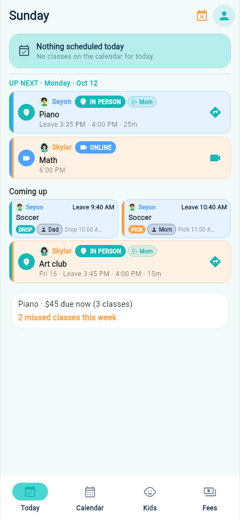
- Today Next class, leave-by time, Directions and Join at a glance.
- Know when to leave Travel minutes turn into leave-by reminders on your phone.
- One-tap join Open Meet, Zoom, or Teams links you saved for online classes.
- Calendar for every kid Color-coded week view across your family’s activities. Export the next 90 days to Apple or Google Calendar.
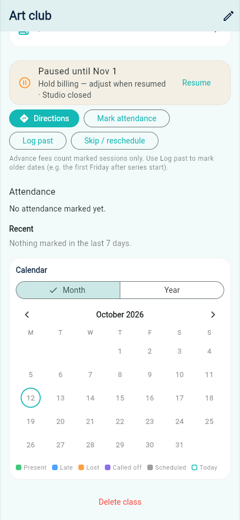
- Pause one class Hide a class until a date or until you resume, and choose whether fees keep going.
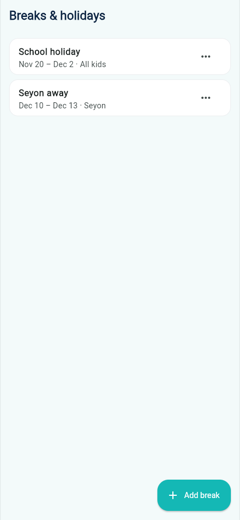
- Breaks & holidays Vacation or school-holiday dates for every child, or just one. Classes come back when you remove the break.
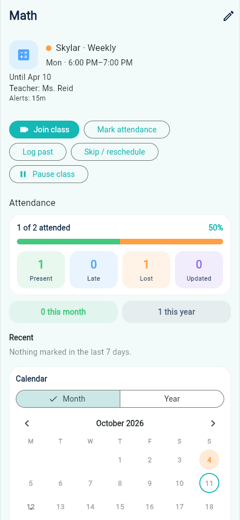
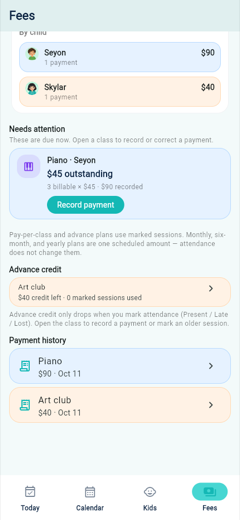
- Attendance & fees Mark who came, and record a payment only when it is actually due.
- Family when you grow One child is free forever. Family adds more children, cloud sync, and another parent.
How it looks
Screens from the app, including pause and holidays. The questions below stay short.
FAQ
Quick answers before you download.
Is ClassPilot free?
One child is free forever, including reminders, attendance, meeting links, directions, calendar, and fee records on that phone. Family is a 30-day free trial, then $0.99 a month or $9.99 a year. Family unlocks unlimited children, cloud sync, and a second parent.
Do my kids need their own accounts?
No. ClassPilot is a parent and guardian tool. Children are profiles you manage. You can optionally pair a tablet to one child’s profile so they can see their schedule and join links under your control.
How do leave-by reminders work?
When you set travel minutes on a class, ClassPilot schedules an on-device reminder so you know when to leave — not only when class starts. The reminder goes to the parent assigned to that drop-off or pickup. The other parent is notified only if you turn on “Also notify the other parent.”
Does it work offline?
Yes. Continue on this device needs no login, and the family stays on that phone. Cloud sync and inviting another parent are part of Family and need a cloud account.
Can I sync with another parent?
Yes, with the Family plan and a cloud account. The household owner invites the other adult with a one-time code. Both then see the same kids, classes, attendance, and payments.
Does ClassPilot charge class tuition?
No. Recording a payment is your own ledger. ClassPilot does not charge tuition and does not connect to a bank. Pay-per-class balances follow sessions you mark. A monthly or term plan is one scheduled amount, and marking attendance does not change it. Family subscriptions are billed only through the App Store or Google Play.
Can a friend use Family without paying?
Yes, for a limited time. Send an App Store offer code or a Google Play promo code. They redeem it in that store with the account that would be billed, then open ClassPilot and tap Restore purchases. An Apple code does not work on Google Play, and a Play code does not work on the App Store. A code lasts up to a year, not forever.
How do I pause a class?
Open the class and tap Pause class. Choose the start date, then either an end date or Until I resume. Sessions in that window leave Today and Calendar. They are not deleted. If the class has a fee, choose whether billing holds until you resume or keeps its usual schedule. An optional note can say why, such as a closed studio. Tap Resume when the class should return. A refund from the teacher is recorded later as a payment adjustment.
How do breaks and holidays work?
Open Settings → Breaks & holidays and tap Add break. Name it, set the start and end dates, and choose All kids or One child. ClassPilot shows how many sessions will be hidden before you save. Those classes leave Today and Calendar for those days only. They are not deleted, and fees do not accrue for the hidden days. Edit or remove the break anytime and the classes come back.
Pause is for one class. A break is a date range, for a vacation or a school holiday, across the family or a single child.
How do I add classes to my phone calendar?
Open Settings → Export calendar. ClassPilot shares a calendar file for the next 90 days, skipping paused classes and holiday breaks. On iPhone, choose Calendar. On Android, open the file with Google Calendar. The export is included on the free plan.
How do I delete my account?
Open Settings → Delete account. That removes your account and family data from the app’s cloud backend when sync is enabled.
Where is the privacy policy?
See Privacy Policy. Questions: classpilot@kitecodestudios.com.
Download
Store links will appear here once ClassPilot is live on the App Store and Google Play. Until then, contact classpilot@kitecodestudios.com.